Building customer loyalty is essential for the long-term success of your business. A well-designed loyalty program encourages customers to return, boosts repeat purchases, and transforms first-time shoppers into loyal fans.
Appy Stamp makes it simple to create a loyalty program tailored to your business that rewards your customers in meaningful ways. Whether you’re launching your first program or enhancing an existing one, this guide will take you step-by-step through the setup process so you can get started quickly.
1. Introduction
Who is this guide for?
This guide is designed for business owners and managers who want to launch a loyalty program fast. By following these steps, you’ll have a basic program ready to reward your customers in just a few minutes.
What you’ll learn
You’ll learn the essentials: setting a clear goal, creating rewards, and launching your loyalty program.
2. Define Your Program’s Goal
Before you start setting up your loyalty program, think about what you want to achieve. A clear goal helps you choose the right rewards and activities and measure how successful your program is over time.
Common goals include:
-
Increase repeat purchases by encouraging customers to come back more often
-
Increase average order value by rewarding customers for spending more
-
Reward loyal customers with exclusive offers or discounts
-
Encourage customer engagement through actions like creating an account, celebrating birthdays, or interacting with your brand
Once you’ve picked your goal, make it specific and measurable. For example:
-
Increase repeat purchases by 20% over the next 6 months
-
Increase average order value by 15% over the next 3 months
-
Boost customer engagement by rewarding more customers each month
Decide how you’ll measure success. Useful metrics include:
-
Repeat purchase rate
-
Average order value (AOV)
-
Reward redemption rate
-
Customer engagement with your loyalty program
Action: Write down the main goal for your loyalty program. You’ll refer back to this as you design your rewards and earning activities.
With your program goals clear, the next step is to install the Appy Stamp loyalty app on your online store to begin setting up your program.
3. Install the Loyalty App on Your Store
Before you can start rewarding customers, you need to install the Appy Stamp loyalty app on your online store. This integration allows your store to track customer purchases and reward activity automatically.
-
Go to the Appy Stamp app page in your store’s app marketplace.
-
Click "Install" and follow the prompts to connect the app to your store.
-
Once installed, you’ll see Appy Stamp in your store’s admin dashboard, ready for setup.
4. Complete the Onboarding Process
After installation, complete the onboarding steps in the Appy Stamp dashboard. This process configures the basic settings of your loyalty program and ensures everything is ready to launch.
-
Follow the guided setup to connect your store data.
-
Set your program’s name, logo, and basic preferences.
-
Review and confirm your program’s goal (from step 2).
Once onboarding is complete, you can start configuring how customers will earn stamps by setting up earning activities.
5. Configure the "Place an Order" Activity

The "Place an Order" activity is how customers earn stamps by making purchases. Setting this up correctly ensures customers are rewarded for shopping with you.
-
In the Appy Stamp dashboard, go to Program Settings Ways to Earn.
-
Select "Place an Order" to create this earning activity.
-
Define how many stamps customers earn per order or per amount spent.
-
Save your settings.
For more details on setting up earn activities click here
6. Add Rewards to Your Program

Rewards motivate your customers to participate and engage with your loyalty program. Adding rewards gives customers something to look forward to.
-
Go to the Rewards section in your Appy Stamp dashboard.
-
Click "Add Reward" and choose the type of reward (e.g., discount, free product, exclusive offer).
-
Set the number of stamps needed to redeem the reward.
-
Customize the reward details and save.
With rewards in place, it’s important to define who can participate in your loyalty program and set the rules for program targeting.
For more details on setting up ways to redeem click here
7. Set Up Stamp Participation
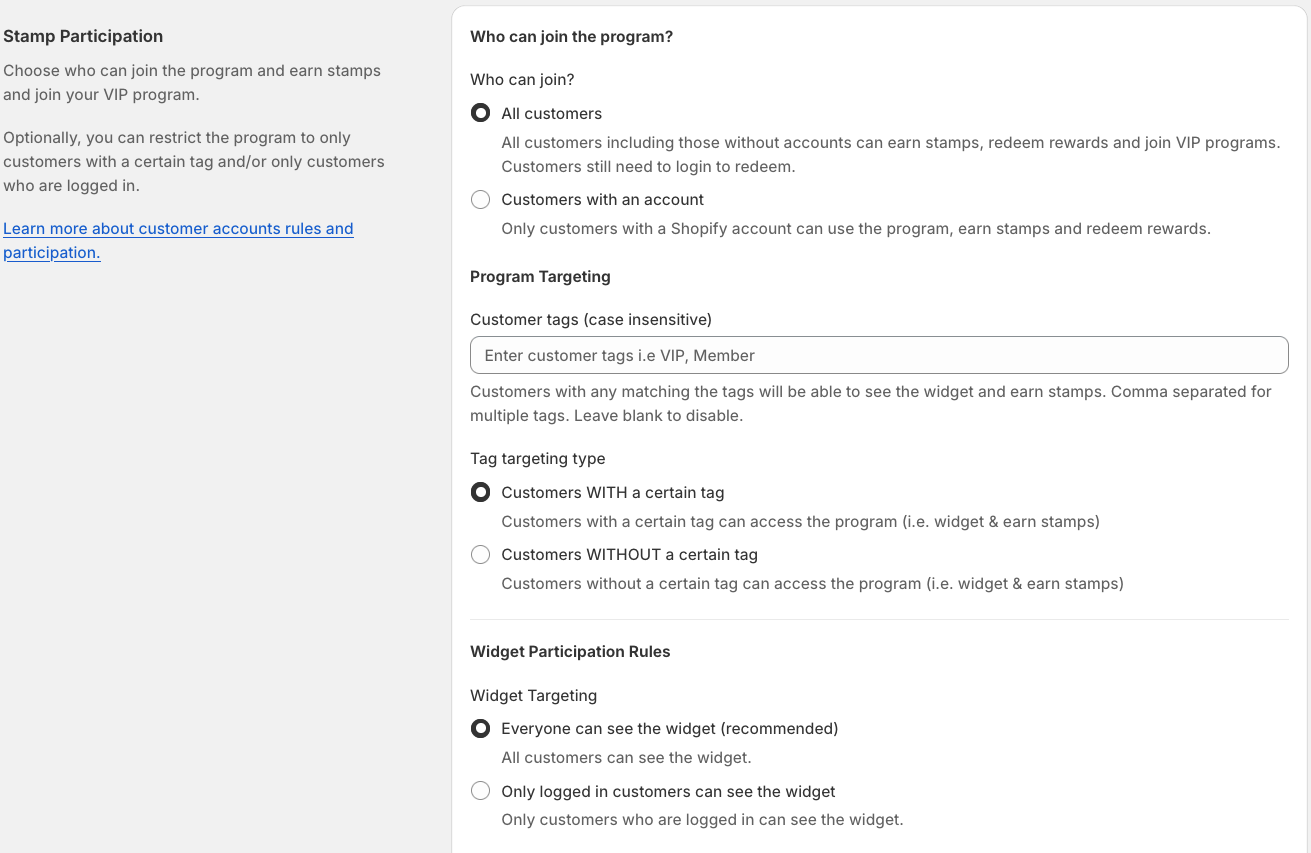
Stamp participation controls who can join your loyalty program and earn stamps. It also includes rules for program targeting and widget participation.
-
In the Appy Stamp dashboard, go to Program Settings Stamp Participation.
-
Choose who can participate in the program, such as all customers or only those with specific tags.
-
Set targeting rules to include or exclude customers based on tags or other criteria.
-
Configure widget participation settings to control which customers see and interact with the loyalty widget.
-
Save your settings to apply the participation rules.
Next, customise the loyalty widget that will appear on your store, allowing customers to track their stamps and rewards easily.
To understand more about stamp participation click here
8. Set Up and Configure Your Widget
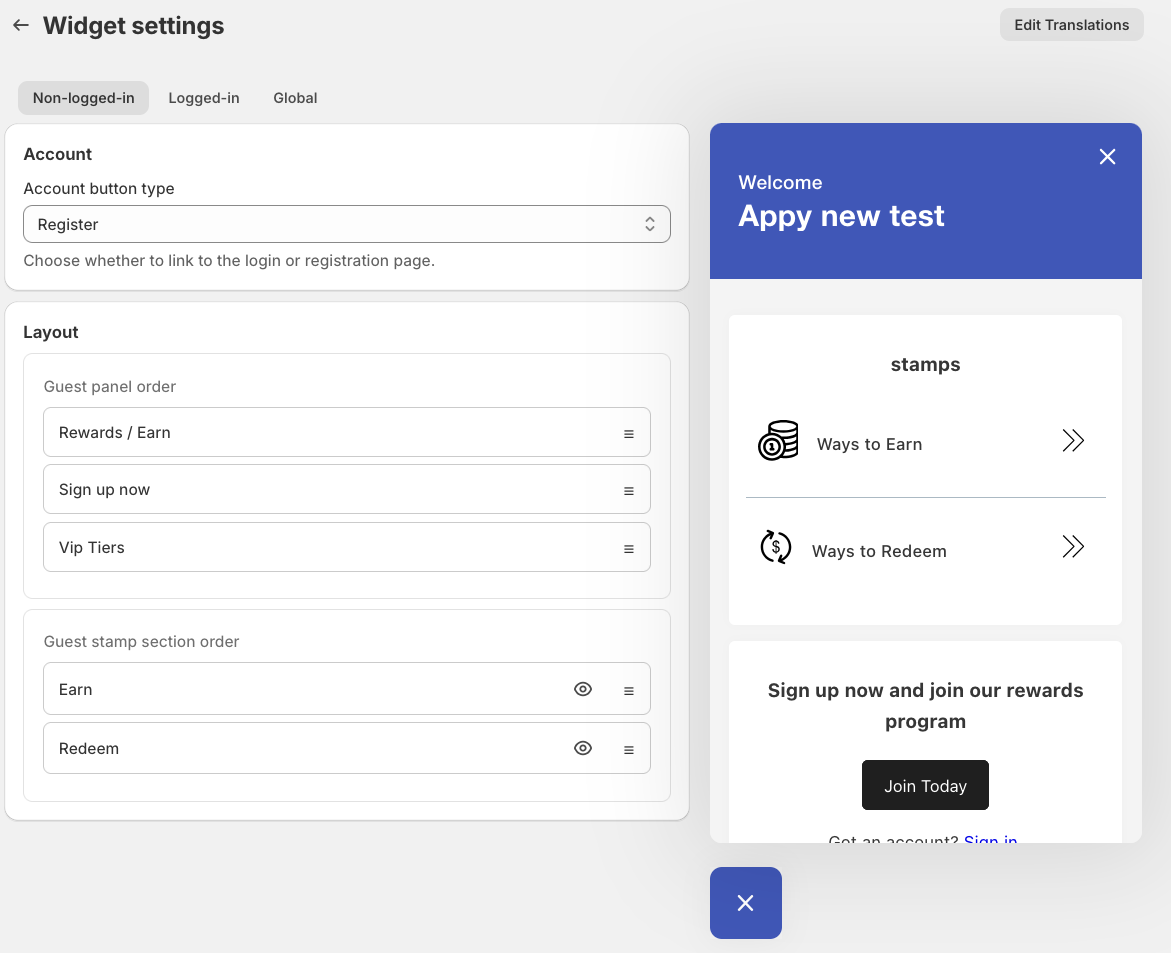
The widget is the interactive loyalty program display that appears on your store’s website. It lets customers see their stamp balance, available rewards, and program details in real time.
-
In the Appy Stamp dashboard, go to Program Settings Widget.
-
Customize the widget appearance to match your brand by selecting colours, fonts, and icons.
-
Add banners or images to make the widget more engaging and aligned with your store’s look.
-
Choose what information to display, such as stamp balance, rewards progress, and VIP tier status.
-
Preview the widget to see how it will appear on your store.
-
Save your settings and ensure the widget is enabled to appear on your website.
Finally, create a dedicated loyalty page on your website to explain your program clearly and keep customers engaged.
For more details on how to customise your widget click here
9. Set Up Your Loyalty Page
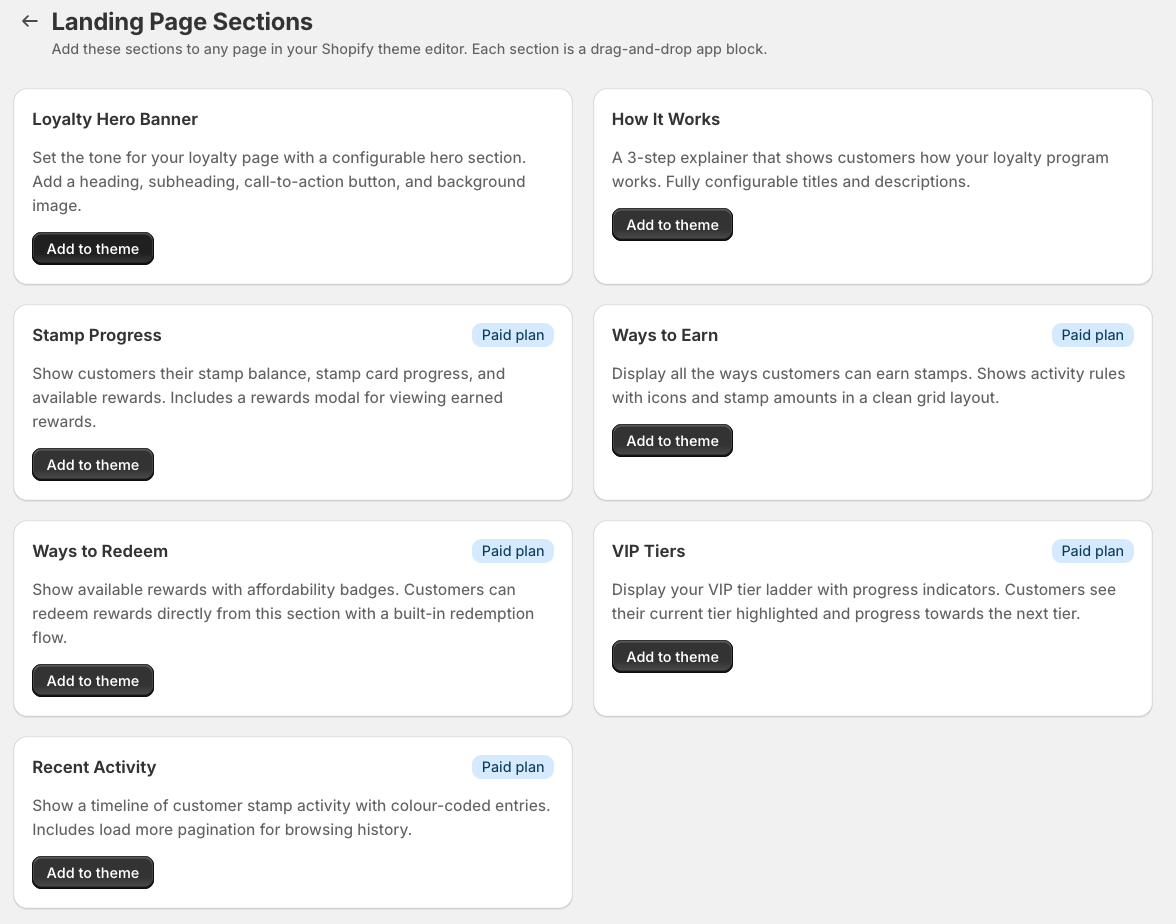
Create a dedicated loyalty page on your website to clearly explain how your loyalty program works, how customers can earn and redeem stamps, and the benefits of joining.
How to set up your loyalty page
-
Hero banner:
-
Add a hero banner at the top of your loyalty page.
-
Briefly describe your loyalty program and its benefits to catch customers’ attention.
-
Explain why customers should join and what they can expect.
-
-
How to Earn Stamps:
-
List the different actions customers can take to earn stamps.
-
Use bullet points or icons to make this section easy to read and scan.
-
-
How to Redeem Stamps:
-
Explain how customers can redeem their stamps for rewards.
-
Include examples of rewards and the number of stamps needed for each.
-
-
FAQs:
-
Add answers to common questions about your loyalty program.
-
Include topics like stamp expiration, how to check stamp balances, and terms and conditions.
-
-
VIP Tiers:
-
Highlight VIP perks and rewards available to loyal customers.
-
Showcase these benefits clearly on your loyalty page.
-
-
Coming soon:
- Use this section to inform customers about upcoming rewards or program updates.
-
Rewards activity:
-
Centralise customers’ loyalty information in one place.
-
Allow them to easily track their stamps and rewards.
-
For more details on setting up your loyalty landing page click here
Once you're all set up, run a few test orders and customer scenarios to ensure your loyalty program works as expected. Try to replicate the actions your average customer would perform, and once you're happy that everything is working correctly, set your program live.